        |
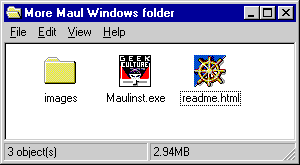
 How to install the Windows screen saver Once you have downloaded the compressed file, unzip it. You will then have the folder "More Maul Windows folder". Opening this folder, you will find directions for installation (readme.html), the images folder for the document, and the screen saver installer "Maulinst.exe".
To install the screen saver, simply double-click on the Maulinst.exe file.
You can then adjust your screen saver preferences with the Windows Display control panel. To quit the screen saver at any time, move your mouse a little (more than 15 pixels to be precise), or hit any key on your keyboard, with the exception of the "s" key or the "Enter" key. The function of these keys is explained next... Screen saver features: Taking screen shots: Press the "s" key to take a screen shot of the current Maul screen. If the screen shot is successful, you should hear a camera shutter sound effect. This will create a file called "moremaul.bmp" in your Windows directory. Note: each time you take a screen shot, this file will be overwritten, so you may wish to rename the screen shot file after taking an especially cherished snap. You can then use this file as a desktop or startup screen. For example, to use it as a desktop under Windows 95, follow these steps:
Hint: if the cursor does not automatically hide itself, move your mouse just a pixel or two, and the cursor will disappear. Troubleshooting On multiple monitors or very large screens, the screen saver will use more memory. If you're having problems launching the screen saver, try lowering your color resolution and/or screen resolution. The screen saver may fail to start and display a "missing file" warning about MSVCRT.DLL ( Microsoft Visual C++ runtime library) if that file is not on the playback system. Starting with Windows 95 OSR 2 Release Microsoft decided to no longer distribute MSVCRT.DLL . Earlier Windows 95 releases did include MSVCRT.DLL with the standard operating system installation. Fortunately some MS service packs and a lot of commercial software installs the DLL, but it is possible to encounter a system that doesn't have it. If you do get the error, Macromedia has provided an installer for the DLL in their downloads area. System Requirements
By clicking "Order Now" you are agreeing to the licensing agreement below. Please read before ordering or using this software. "More Maul: A Jedi Knightmare" is an unauthorized parody and is not licensed by Lucasfilm, Ltd. or any third parties.
(If you need a good .zip extractor, we recommend: Aladdin Expander for Windows, available for free download at http://www.aladdinsys.com.) |
|||
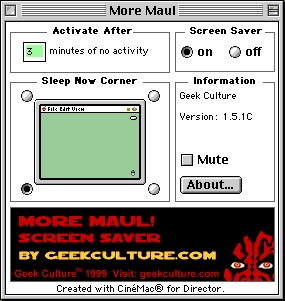
How to install the Power Mac version: After you have purchased the screen saver from our webstore, you will shortly receive (via email) directions and passwords for downloading. Be sure to enter the login name and password exactly as given, as they are case sensitive. Once you have downloaded the .sit or .hqx file, and un-stuffed it, you will have a folder containing directions and the screen saver control panel "More Maul".
Screen Saver Preferences If you wish to have the screen saver run silently (while changing modes or taking screen shots), you can turn off its sound by checking the "Mute" button. To end the screen saver at any time, move your mouse a little (more than 15 pixels to be precise) or hit a key on your keyboard (other than the "return" or "s" key).
Taking screen shots: Press the "s" key to take a screen shot of the current Maul screen. This will create a file called "moremaul.pict" in your Control Panels folder. You can then use this file as a desktop or startup screen. Note: each time you take a screen shot, this file will be overwritten, so you may wish to rename your screen shot file after each snap. The More Maul screen saver is very processor intensive, so on some machines there may be a delay between the time when you press the "s" key and when the snap is actually taken. Any such delay will depend on your computer's processor, as well as which animation sequence is currently on the screen. (For instance, the rotating 3-D heads segment is particularly computationally intensive). Troubleshooting On multiple monitors or very large screens, the screen saver will use more memory. If you're having problems launching the screen saver, try lowering your color resolution and/or screen resolution. If the screen shot function or mode change function is sluggish, it may be due to the intensive processor demand of the screen saver. Any such delay will depend on your computer's processor, as well as which animation sequence is currently on the screen. FreePPP is known to conflict with screen savers created using Cinemac®, like this one is. If you can, we recommend you switch to PPP (free from Apple) or use Open Transport. System Requirements
By clicking "Order Now" you are agreeing to the licensing agreement below. Please read before ordering or using this software.
Copyright © 1999 Geek Culture. All Rights Reserved. Other product names are trademarks or registered trademarks of their respective holders. |




"More Maul: A Jedi Knightmare" is an unauthorized parody and
is not licensed by Lucasfilm, Ltd. or any third parties.
| PLEASE READ THIS SOFTWARE LICENSE AGREEMENT ("AGREEMENT") BEFORE PROCEEDING. BY CLICKING "ORDER," YOU ARE AGREEING TO BE BOUND BY THE TERMS OF THIS AGREEMENT. IF YOU DO NOT AGREE TO THE TERMS OF THIS LICENSE, DO NOT CLICK "ORDER", AND DO NOT BUY THIS SOFTWARE, AND FEEL LEFT OUT FOR THE REST OF YOUR LIFE. 1. License. Geek Culture hereby licenses to you the software and documentation accompanying this Agreement whether on disk, in read only memory, on any other media or in any other form. You own the media containing the software but Geek Culture retains ownership of the software. The software in this package and any copies which this Agreement authorizes you to make are subject to the terms of this Agreement. 2. Permitted Uses and Restrictions. You may install and use the software on a single licensed computer at a time. The software is not authorized to exist on more than one computer at a time. You may make one copy of the software in machine-readable form for backup purposes only. The backup copy must include all copyright information contained on the original. You may not decompile, reverse engineer, disassemble, modify, rent, lease, loan, sublicense, distribute or create derivative works based upon the software in whole or part or transmit the software over a network or from one computer to another. THE SOFTWARE IS NOT INTENDED FOR USE IN THE OPERATION OF NUCLEAR FACILITIES, AIRCRAFT NAVIGATION, COMMUNICATION SYSTEMS, OR AIR TRAFFIC CONTROL MACHINES IN WHICH CASE THE FAILURE OF THE SOFTWARE COULD LEAD TO DEATH, PERSONAL INJURY, OR SEVERE PHYSICAL OR ENVIRONMENTAL DAMAGE. Your rights under this License will terminate automatically without notice from Geek Culture if you fail to comply with any term(s) of this Agreement. 3. Limited Warranty on Media (if applicable). Geek Culture warrants the media on which the software is recorded to be free from defects in materials and workmanship under normal use for a period of ninety (90) days from the date of original retail purchase. Your exclusive remedy under this paragraph shall be, at Geek Culture’s option, a refund of the purchase price of the product containing the software or replacement of the software which is returned to Geek Culture with a copy of the receipt. THIS LIMITED WARRANTY AND ANY IMPLIED WARRANTIES ON THE MEDIA INCLUDING THE IMPLIED WARRANTIES OF MERCHANTABILITY AND FITNESS FOR A PARTICULAR PURPOSE ARE LIMITED IN DURATION TO NINETY (90) DAYS FROM THE DATE OF ORIGINAL RETAIL PURCHASE. SOME JURISDICTIONS DO NOT ALLOW LIMITATIONS ON THE TERM OF AN IMPLIED WARRANTY, IF THIS AGREEMENT IS SUBJECT TO THE LAWS OF SUCH JURISDICTION THIS LIMITATION MAY NOT APPLY. THE LIMITED WARRANTY SET FORTH HEREIN IS EXCLUSIVE AND IN LIEU OF ALL OTHER WARRANTEES AND GUARANTEES, WHETHER ORAL OR WRITTEN, EXPRESS OR IMPLIED. GEEK CULTURE SPECIFICALLY DISCLAIMS ALL OTHER WARRANTIES. THIS LIMITED WARRANTY GIVES YOU SPECIFIC LEGAL RIGHTS, AND YOU MAY ALSO HAVE OTHER RIGHTS WHICH VARY BY JURISDICTION. For reasons I'm sure you can understand, we cannot offer refunds on downloaded software. DISCLAIMER: This screensaver is sole product of Geek Culture for the purpose of satire and parody and is not licensed by Lucasfilm, Ltd. or any third parties, and has not been authorized by anyone else, especially not the producers, broadcasters, directors or makers of any television show or movie nor any of the actors or actresses playing the characters of any television show or movie. |
©1999 Geek Culture®
All rights reserved.
Contact Geek Culture